
What Makes Cover Actions Premium Different?
There are plenty of ways to create a product mockup today.
But not every mockup starts from the same foundation.
1. Built From Real-World Dimensions — Not Just Made to Look Good
Most mockup creators start with the question:
“How can I make this look good?”
CoverActionsPremium starts somewhere else:
“What are the actual dimensions and physical characteristics of this product?”
Before creating the Photoshop mockup, we first establish the product’s real-world dimensions, proportions and construction, then build an accurately sized 3D representation of the product.
That 3D model becomes the physical foundation for the Photoshop mockup.
We then translate that accurately constructed 3D product into our Photoshop Action workflow.
So the process is:
Real-World Product Specifications > Accurately Sized 3D Model > Photoshop Action Mockup
This matters because the product isn’t being shaped or proportioned inside Photoshop simply to make the image look convincing.
The Photoshop mockup is based on a 3D product that was established first according to its intended real-world dimensions.
For example:
A 6 × 9 inch book with a 0.75-inch spine isn’t simply a generic book image with a cover dropped onto it. The 3D book is constructed around those dimensions, so the spine, cover proportions and perspective have a physical basis.
An 8ft table cover isn’t simply a rectangular graphic. The 3D representation is based on the actual table configuration and the corresponding artwork area.
A trade-show booth isn’t just a background. Its walls, counter, fascia, depth and viewing geometry are based on the intended physical configuration.
No random sizing. No guessed proportions.
That difference is at the heart of Cover Actions Premium.
2. Real-World Sizes. Real Proportions. Built With Precision.
2. Real-World Sizes. Real Proportions. Built With Precision.
Many mockup creators prominently state the output resolution of their mockups — 4,000 × 4,000 pixels, 5,000 × 5,000 pixels, and so on.
High-resolution output has become a standard expectation for professional mockups.
But there is an important distinction:
That tells you the size of the image — not the size of the product.
A 4,000 × 4,000 pixel image doesn’t tell you whether the book inside it is 5 × 8 inches, 6 × 9 inches, or something completely different.
At CoverActionsPremium, we don’t treat pixel dimensions as the product specification.
Our mockups are built around real-world product dimensions and proportions.
So when you see a book specified as 6 × 9 inches with a 0.75-inch spine, those dimensions describe the product being represented — not merely the canvas on which the final image was rendered.
The same principle applies to our tables, booths, boxes, binders and other physical products.
Pixel dimensions tell you how large the image is.
Real-world dimensions tell you what the product actually is.
Real-World Sizes. Real Proportions. Built With Precision.
3. Purpose-Built Mockups — Not One-Size-Fits-All
Different sizes and configurations of the same type of product can require completely different mockups.
A 6 × 9 inch book isn’t the same as an 8.5 × 11 inch book.
An 8.5 × 11 inch tri-fold brochure isn’t the same as an A4 tri-fold brochure.
Even when two products look similar at first glance, their dimensions and proportions can be different — and those differences matter when you’re presenting a real product.
That’s why we don’t try to make one generic mockup fit everything.
Our mockups are created around specific product sizes, proportions and configurations, so the product you’re presenting has a meaningful physical reference behind it.
This is particularly important when your artwork needs to match a real product that will actually be printed, manufactured or sold.
One product type does not mean one universal size.
That’s why CoverActionsPremium offers purpose-built mockups for specific real-world products and configurations.
4. One-Click Rendering vs. Repetitive Manual Placement
Your Complete Design In. Your Finished Mockup Out.
Not all Photoshop mockups work the same way.
With many conventional PSD mockups that use Smart Object placeholders, you may need to separate your complete design into individual elements, place each element into its corresponding Smart Object, adjust it if necessary, and save each one before returning to the main mockup.
That’s manageable when a mockup has only one or two placeholders.
But what happens when your design contains multiple individual elements?
A book cover, spine, back cover, DVD label, box cover and other components may each require separate placement and saving. The more elements your design contains, the more repetitive work you may face, increasing the risk of confusion and mistakes.
CoverActionsPremium takes a different approach.
Instead of manually inserting your artwork into multiple individual Smart Objects, our Photoshop Action workflow lets you place your complete design layout into a supplied starter template.
Then simply press Play.
The Action automatically renders your design into the finished mockup, creating the product presentation without requiring you to manually populate and save every component one by one.
One complete layout. One click. A finished product mockup.
Spend less time managing individual placeholders and more time creating, presenting and selling your work.
That’s the convenience of the CoverActionsPremium Photoshop Action workflow.
5. Create Multiple Product Views From One Template
One physical product doesn’t have to mean one presentation.
Our Cover Actions can produce different views and presentations from a single starter template—giving you the flexibility to show your product from different angles and perspectives.
Use different views for:
- Product pages
- Marketing graphics
- Client presentations
- Sales pages
- Social media
- Advertising
- Portfolio presentations
One design. Multiple realistic presentations.
Check out some examples:
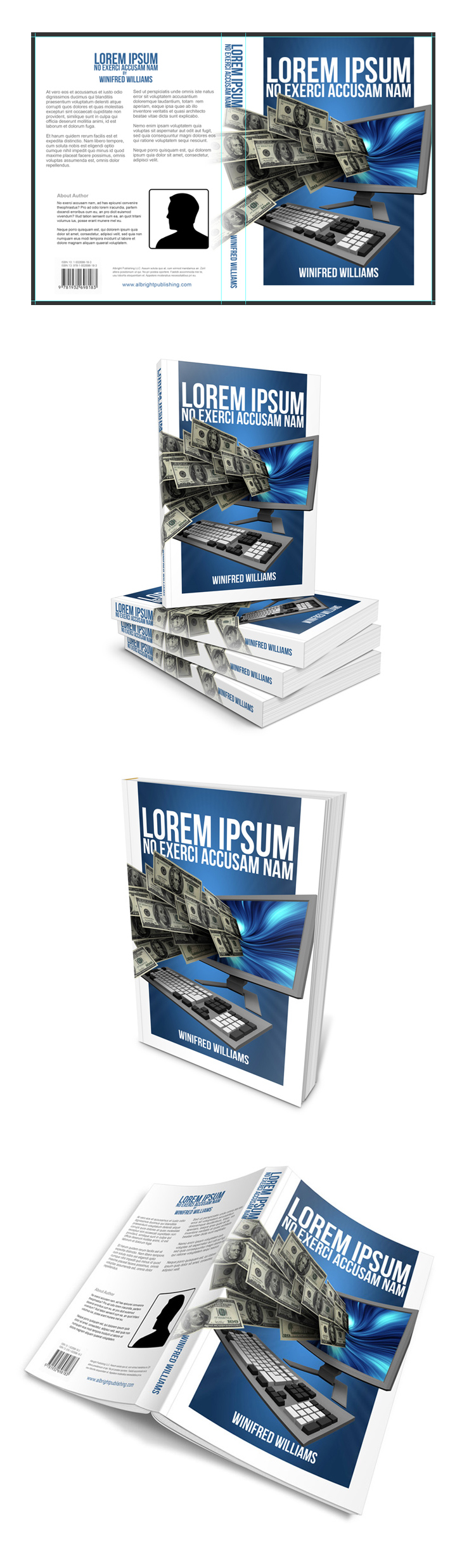
And there’s much more inside.
6. Powerful Combo & Bundle Mockups
Single mockups aren’t always enough.
If you’re selling a home study course, boxed book set, software package, branding package, DVD collection or other multi-piece product, combining unrelated mockups can produce awkward results.
Different objects may have different perspectives, angles, lighting and proportions—making them difficult to combine convincingly.
That’s why Cover Actions Premium includes a huge selection of purpose-built combo and bundle mockups.
Create presentations for:
- Home study courses
- Boxed book sets
- Software packages
- Product bundles
- Book + CD/DVD combinations
- Branding packages
- Multi-product collections
- And much more
 |
 |
 |
 |
 |
 |
 |
 |
 |
 |
 |
 |
 |
 |
 |
 |
 |
 |
 |
 |
 |
 |
 |
 |
 |
 |
 |
 |
 |
 |
 |
 |
One click can turn a flat design into a complete product presentation.
And because the components are designed to work together, you don’t have to spend hours trying to make unrelated mockups line up.
7. Photoshop Actions That Do the Heavy Lifting
We don’t expect you to manually render every perspective, shadow and product surface yourself.
Simply place your complete artwork into the supplied starter template, then play the Cover Action.
The Action generates the finished Photoshop presentation for you.
Drop in your artwork. Press Play. Get the finished mockup.
You retain the flexibility of Photoshop while eliminating much of the repetitive work involved in creating realistic product presentations manually.
And because the result is generated into Photoshop, you can continue working with the resulting PSD layers.
8. Perfect Fit — Without Stretching or Warping
Your artwork should fit the product—not the other way around.
Our mockups use custom layered PSD templates designed for the specific product they represent.
That means artwork placement, proportions and surfaces are designed around the intended product dimensions.
The goal is simple:
Your artwork stays crisp, properly positioned and visually believable.
No forcing a square design onto a rectangular product.
No stretching artwork until it approximately fits.
No guessing where a fold, spine or panel should be.
9. Photo-Realistic Results Based on 3D Product Geometry
Realism isn’t just about adding shadows.
A believable product presentation depends on the relationship between:
- Shape
- Perspective
- Proportion
- Depth
- Lighting
- Surface position
- Viewing angle
Our mockups are built using accurate 3D references of the products being represented, allowing the finished Photoshop rendering to maintain believable physical relationships.
The result is more than a flat graphic with a few effects added.
It’s designed to look like a real product photographed or rendered from a real physical object.
10. Mockups Made to Order
Our catalog isn’t created entirely from a predetermined list.
Many Cover Actions have originated from requests and ideas from working professionals—including graphic designers, illustrators, marketers, photographers, publishers and other creative professionals.
When there is a real-world product or presentation people need, we look for opportunities to turn that need into a practical Photoshop mockup.
That’s one reason the catalog continues to expand into different products, sizes and configurations.
11. Fresh New Cover Actions Every Week
The catalog doesn’t stand still.
We release new Photoshop Action mockups and matching PSD templates every week.
We also revisit older mockups when improvements can make them easier to use, more flexible or better suited to modern Photoshop workflows.
So membership isn’t simply access to a collection that was created years ago.
It’s access to a catalog that continues to grow and evolve.
New mockups. New products. New possibilities. Every week.
12. Handcrafted — Not AI-Generated
AI can produce an impressive-looking image in seconds.
But a convincing image isn’t necessarily an accurate product mockup.
When the actual product matters, you may need more than a picture that looks right at first glance.
You may need:
- Defined product dimensions
- Correct proportions
- Meaningful depth
- Accurate surfaces
- Editable Photoshop layers
- Repeatable results
- Control over the final presentation
That’s why our mockups are handcrafted Photoshop products, built around defined physical objects rather than generated by an algorithm guessing what the product should look like.
The difference isn’t simply human-made versus AI-made.
It’s whether the mockup understands the physical product it represents.
13. High-Resolution 300 PPI Output
Professional presentation requires professional output.
Our Cover Actions mockups are created at 300 PPI, providing crisp, detailed results suitable for professional digital presentations and high-quality print applications.
Whether you’re creating a product page, sales graphic, portfolio image or printed marketing material, you get sharp, professional-looking results.
The Cover Actions Premium Difference
A generic mockup can make your artwork look good.
We build mockups to make your artwork look like it belongs on the real product.
That’s why our process starts with the physical object:
Real dimensions.
Real proportions.
Real construction.
Real perspective.
Real product relationships.
Then we turn that physical foundation into a practical Photoshop workflow that lets you create realistic product presentations quickly.
No random sizing. No guessed proportions.
Just purpose-built Photoshop mockups based on real-world products.
Cover Actions Requirement & Compatibility:
** ENGLISH Version Adobe Photoshop CS2, CS3, CS4, CS5, CS6, CC up to Photoshop 2026 pre-installed on Microsoft Windows OR Apple Mac OS.
Don’t have Photoshop? Get Your 7-Day Free Trial HERE
Create stunning covers for your product with a couple of clicks and see how the new look increases your conversion rate.
A message from admin:
“Thanks so much for your interest in CoverActionsPremium.com—the biggest collection of Photoshop Cover Actions and product mockups online.
Cover Actions Premium is a long-term passion project, with ongoing effort to keep improving and delivering the best quality, value, and usability.
Think of our site as your personal mockup library or store—whenever you need a mockup for your project, just swing by and grab what you need.
If you have any enquiries, please feel free to contact me HERE and I will answer your questions personally.”
Best regards,

Admin, Creator & Graphics Designer
CoverActionsPremium.com